
How to Get Unlimited Transcription and Summaries Without Plaud Unlimited

Use HoldSay on a Mac or Windows PC for unlimited local transcription and summaries without Plaud Unlimited. For more than 60 hours a month, record online meetings directly in HoldSay. Keep Plaud only for phone calls, in person meetings, and other audio recorded away from your computer, then import those files into HoldSay.

Use HoldSay instead of Plaud Unlimited for the high volume processing. Record online meetings directly in HoldSay. For phone calls and in person meetings, record with Plaud, export the original MP3 or WAV file, and drop it into HoldSay for unlimited local transcription, speaker separation, meeting notes, editable text, and search. Plaud Starter includes 5 transcription hours each month.
This page responds to a real question in r/PlaudNoteUsers, titled “Plaud or an alternative tool for 60 hours + per month.” The writer is an independent consultant who wanted speaker separated transcripts and summaries for a high volume of calls and meetings, but needed to keep the monthly cost down and verify the workflow first. Their question was a “workaround for unlimited plan without paying unlimited.”
What is the practical alternative to Plaud Unlimited?
HoldSay is the practical processing alternative for both online recordings and Plaud audio that you export to a computer. HoldSay is a one time purchase with no transcription hour quota and processes recordings locally on a Mac or Windows PC.
HoldSay records system audio and microphone audio at the same time for online meetings, capturing both sides without Plaud or a call bot. HoldSay can then create transcription, speaker separation, meeting notes, editable text, and search.
When should I use HoldSay only, or Plaud with HoldSay?
HoldSay only is suitable when most work happens in online meetings on a Mac or Windows PC. HoldSay captures the meeting audio directly, so Plaud is not needed for those recordings.
Plaud with HoldSay is suitable when phone calls, in person meetings, or other recordings happen away from a computer. Plaud remains useful for portable capture, while HoldSay processes the exported audio after it reaches the computer.
For a broader product decision covering hardware, desktop recording, privacy and current plan prices, read the full HoldSay vs Plaud comparison.
How do I process Plaud recordings in HoldSay?
HoldSay processes Plaud recordings after you export Plaud audio and move it to the Mac or Windows PC running HoldSay.
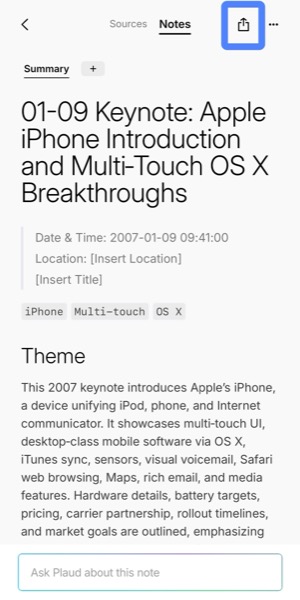
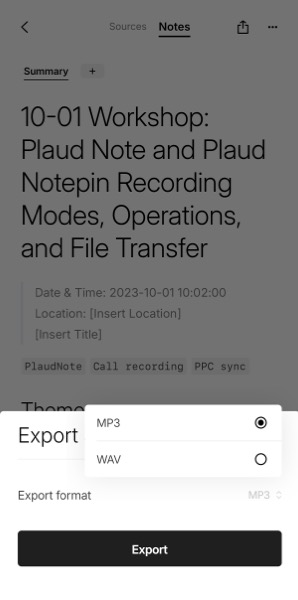
Plaud App screenshots and export steps were checked against the Plaud export documentation on Aug 18, 2026.
- Export the Plaud recording as MP3 or WAV using the Plaud export documentation.
- Move the exported file to the Mac or Windows PC with HoldSay.
- Drag the MP3 or WAV file into HoldSay.
- HoldSay retains the original audio and locally produces transcription, speaker separation, meeting notes, editable text, and search.

How should I test this workflow before paying?
Test HoldSay with one normal online recording and one actual Plaud import before paying. This confirms that both direct meeting capture and exported portable recordings fit the intended workflow.
Decide whether to keep Plaud from the remaining hours that genuinely require portable capture. HoldSay covers the online recordings and can process the exported Plaud audio locally, so Plaud Unlimited is not needed for those processing hours.
Frequently asked questions
How can I avoid paying for Plaud Unlimited?
Use Plaud only to capture audio away from a computer, then export the file to HoldSay. HoldSay locally creates transcription, speaker separation, meeting notes, editable text, and search without a transcription hour quota.
Can I use Plaud without a transcription subscription?
Yes. Use Plaud hardware for phone calls and in person recordings, then export the original audio to HoldSay for processing. Plaud Starter includes 5 transcription hours each month, but HoldSay does not use that quota.
Is HoldSay or Plaud better for online meetings?
HoldSay is the direct option for online meetings on a Mac or Windows PC. It records system audio and microphone audio simultaneously, captures both sides, and does not add a call bot. Plaud remains useful when the conversation happens away from a computer.
Can I export Plaud audio and transcribe it with another app?
Yes. Export Plaud audio as MP3 or WAV, move it to the computer running HoldSay, and drag it in. HoldSay then processes the file locally instead of using Plaud transcription hours.
What happens when I import a Plaud MP3 or WAV into HoldSay?
HoldSay retains the original Plaud audio and locally creates a transcript, speaker separation, meeting notes, editable text, and search from the same imported recording.
Can HoldSay identify speakers in imported Plaud recordings?
Yes. When a Plaud MP3 or WAV is imported into HoldSay, HoldSay performs speaker separation alongside the transcript and retains the original audio for checking the result.
How much of a 60 hour month does Plaud Starter cover?
Plaud Starter includes 5 transcription hours each month. A 60 hour month is twelve times that allowance, so the high volume transcription and summary work is better routed to HoldSay.
Do I need Plaud Unlimited for more than 60 hours a month?
Not for this workflow. Keep Plaud hardware when you need portable capture, then export the audio to HoldSay for local transcription and summaries. Exported Plaud recordings do not need Plaud transcription hours.
What should I test before choosing between Plaud and HoldSay?
Test one normal online meeting directly in HoldSay and one representative Plaud recording imported into HoldSay. Confirm that the transcript, speaker separation, meeting notes, original audio, and search work for your own recordings, then count the hours that genuinely need portable capture.
Was this page accurate? If something here does not match what you see, tell us at support@holdsay.com and we will fix the page.